


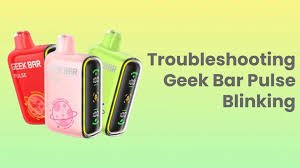
If you’re anything like me, your Geek Bar is probably your go-to for a smooth and flavorful vaping experience. But let’s be honest—nothing’s more frustrating than when your trusty geek bar starts acting up or losing its edge way before you expect it to. The good news? With a little bit of regular maintenance and care, you can extend the lifespan of your Geek Bar and keep it hitting like new for much longer.
In this post, I’ll walk you through some essential maintenance tips to help you get the most out of your Geek Bar Pulse 15K (or any other Geek Bar model). Plus, I’ll cover how to troubleshoot common issues like how to reset a Geek Bar Pulse when things go sideways. Let’s dive in!
✅ Why Proper Maintenance Matters
Like any vaping device, your Geek Bar isn’t immune to wear and tear. Over time, things like clogged airflow, dirty contacts, and depleted batteries can take a toll on your vape’s performance. But with regular care, you can:
- Prolong the battery life – No one likes a dead vape halfway through the day.
- Maintain consistent flavor – A clean vape equals better taste.
- Prevent malfunctions – Regular maintenance helps avoid annoying issues like weak hits or dry burns.
Taking care of your Geek Bar Pulse 15K means you won’t have to replace it as often, saving you money in the long run. Sounds like a win-win, right?
🛠️ Essential Geek Bar Maintenance Tips
To keep your Geek Bar performing at its best, here’s a list of simple but effective maintenance steps you should follow:
1. Clean the Mouthpiece Regularly
The mouthpiece is where you draw each puff, so it’s naturally prone to buildup from dust, pocket lint, and vape residue. A clogged mouthpiece can restrict airflow and weaken your hit.
How to clean it:
- Remove the mouthpiece if possible (or clean around it if it’s fixed).
- Use a cotton swab dipped in isopropyl alcohol to clean the inside.
- Let it dry completely before using it again.
👉 Pro Tip: Clean your mouthpiece at least once a week for the best results.
2. Keep the Airflow Clear
Poor airflow is one of the most common problems with vapes, and your Geek Bar is no exception. Dust and debris can accumulate in the airflow holes, leading to weak or uneven hits.
How to fix it:
- Use a thin pin or needle to gently clear out the airflow holes.
- Avoid storing your Geek Bar in dusty or linty places (like the bottom of your bag).
3. Charge Your Geek Bar Properly
A weak battery can result in poor vapor production and weak flavor. The geek bar pulse 15k comes with a rechargeable battery, which means you need to take care of your charging habits.
Best charging practices:
- Use the recommended charging cable and adapter.
- Don’t leave your Geek Bar charging overnight—it can overheat the battery.
- Avoid charging it to 100% every time; keeping it between 20% and 80% extends battery life.
👉 Pro Tip: If you notice the battery draining faster than usual, it might be time to give it a reset. (More on that below!)
4. Store It Correctly
Where and how you store your Geek Bar makes a huge difference in how long it lasts.
Storage tips:
- Keep it in a cool, dry place.
- Avoid exposing it to direct sunlight or extreme heat (like leaving it in the car).
- Store it upright to prevent leaks.
5. Use It Regularly (But Not Excessively)
Believe it or not, using your Geek Bar too infrequently can actually shorten its lifespan. The coil and wicking material can dry out if left unused for too long. On the flip side, overuse can burn out the coil faster.
Balance is key:
- Try to use it regularly but avoid chain vaping.
- If you plan to store it for a while, make sure to clean it and partially charge the battery first.
🔄 How to Reset a Geek Bar Pulse
If your Geek Bar Pulse 15K isn’t hitting right or the light isn’t coming on, it might need a reset. This simple process can fix minor glitches and improve performance.
Steps to Reset a Geek Bar Pulse:
- Turn it off – If your model has an on/off switch, power it down.
- Press the button (if applicable) – Hold down the button (if your model has one) for about 10–15 seconds.
- Check the contacts – Make sure there’s no dirt or debris blocking the connection.
- Reconnect the battery – If you can access the battery, disconnect and reconnect it.
- Turn it back on – Power it back on and try a test puff.
👉 Pro Tip: If resetting doesn’t fix the problem, try cleaning the airflow and charging it fully before attempting another reset.
🚫 Common Mistakes to Avoid
Even with good maintenance habits, there are a few pitfalls that can shorten the lifespan of your Geek Bar:
- Overcharging the battery – Leaving it plugged in overnight can weaken battery health over time.
- Letting it run dry – Vaping on an empty tank or pod can burn the coil, ruining the flavor and airflow.
- Using the wrong charger – A charger with the wrong voltage can damage the battery.
- Ignoring leaks – If you notice e-liquid pooling around the mouthpiece or airflow holes, clean it immediately to prevent damage.
🎯 Signs Your Geek Bar Needs a Replacement
Even with the best care, no vape lasts forever. If you notice these signs, it might be time for a new Geek Bar:
- Burnt taste – This usually means the coil is shot.
- Weak hits – If the vapor production is consistently low, the battery or coil may be failing.
- Frequent leaks – A worn-out seal can cause constant leaks.
- Battery won’t hold a charge – If it dies after just a few puffs, the battery is likely done.
🌟 Final Thoughts
Taking care of your Geek Bar isn’t complicated—it just takes a little bit of regular maintenance and attention to detail. Keeping the mouthpiece clean, charging it properly, and knowing how to reset a geek bar pulse when needed can go a long way in extending its lifespan.
The Geek Bar Pulse 15K is built to deliver consistent, flavorful hits, but with these simple tips, you can keep it performing at its best for much longer. So go ahead—show your Geek Bar some love, and it’ll keep you puffing happily for a long time to come!
Have any maintenance tips of your own? Drop them in the comments—I’d love to hear what’s working for you! 😎




Leave a Reply